


astravue

Astravue MCP Server

Use any AI  to run your projects

Connect Claude, ChatGPT, Gemini, and more directly to your Astravue workspace. Ask questions. Create tasks. Track progress. All from one conversation.

carouseltext
mcp-server
AI Partners Section

Works with Every Major AI Assistant

ChatGPT
Claude
Gemini
Cursor
Co pilot
Any MCP Client
MCP Section

What is MCP?

The Bridge between AI
and Your Work

MCP stands for Model Context Protocol - an open standard that lets AI assistants like Claude securely connect to software tools like Astravue.

Think of it like a universal plug socket. Without MCP, every AI tool would need its own custom connector for every app.

Astravue's MCP server means your AI can read, create, and update your project data - all without you leaving your chat window.

How the connection works

Your AI

Claude, ChatGPT

Astravue MCP

Secure bridge

Astravue

Your workspace

Your credentials are never shared with the AI.

OAuth 2.0 authentication
Permission-based data access
Zero data stored or cached
Read + write access

Capabilities

Everything you can do with Astravue MCP

Ask your AI to take action across your entire workspace - no switching tabs, no copy-pasting.

vector icon

Browse projects & tasks

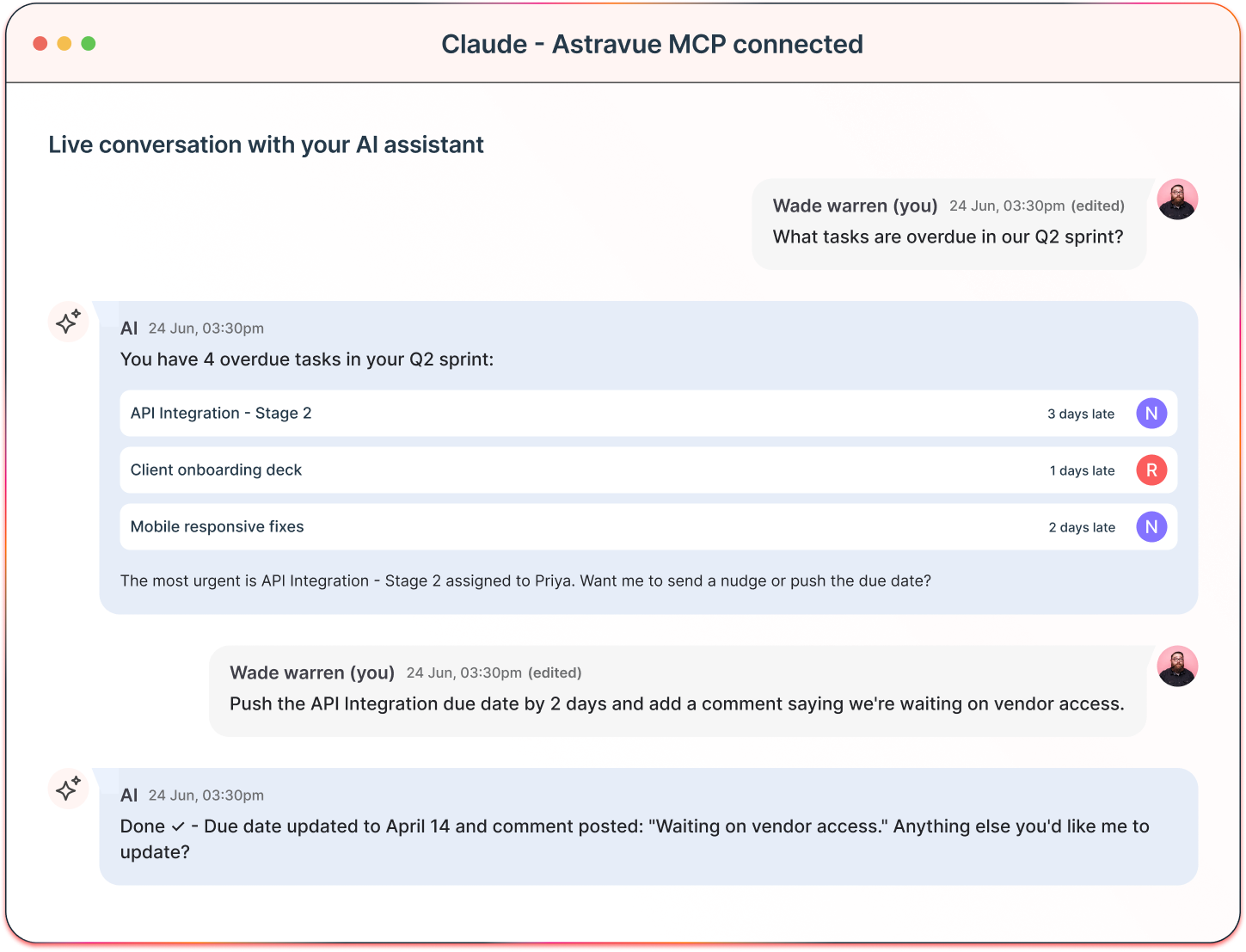
Ask your AI to list open tasks, filter by assignee, or find what's overdue - all in plain English, across every project.
vector icon

Create tasks instantly

Describe what needs to be done. Your AI creates the task, sets the due date, assigns it to the right person - in one step.
vector icon

Update task status

Move tasks from In Progress to Done, bump priorities, or reschedule deadlines - without ever opening the Astravue app.
vector icon

Post comments

Keep your team updated by posting task comments from your AI chat. Notes, blockers, decisions - all captured in context.
vector icon

Sprint summaries

Ask "How's the sprint going?" and get a real-time view of what's done, what's blocked, and who's carrying the load.
vector icon

Time tracking

Log hours, check timesheets, and pull billing summaries - just by asking. No manual entry, no tab switching.

Setup

Up and running in 4 steps

No engineers. No code. Just a URL and your Astravue login - you're ready in under 2 minutes.

01

Open your AI tool

Go to the integrations or connectors section in Claude, ChatGPT, or whichever AI assistant you use.

next
02

Add Astravue MCP

Paste the Astravue MCP server URL — or find it in the connector gallery. Takes under 30 seconds.

next
03

Authenticate securely

Log in with your Astravue account. OAuth 2.0 keeps your credentials completely private from the AI.

next
04

Start asking

Your AI now has live access to your workspace. Ask anything — it reads, creates, and updates on your behalf.

What teams ask Astravue

MCP every day

From project managers to developers, Astravue MCP fits how different roles think and work.

Project Manager

“Give me a status update on the website redesign project.”

Astravue MCP pulls live data and gives your AI a complete picture - tasks completed, what's blocked, and who's working on what.

Developer

“Create a bug ticket for the login timeout issue and assign it to me.”

Your AI creates the task, applies labels, sets priority, and assigns it - all without you touching the Astravue app.

Agency Owner

“How many billable hours did the team log on ABC Corp this week?”

Astravue MCP fetches your time entries and delivers the numbers ready to drop into your client report or invoice.

Team Lead

“What tasks are due this week and who is overloaded?”

Your AI scans all deadlines and workloads across every project and surfaces risks before they become delivery problems.

Security

Your data stays yours - always

Built on the same enterprise security foundation as the rest of Astravue.

vector icon

OAuth 2.0 authentication

Your Astravue credentials are never shared with your AI assistant. You authenticate once through Astravue's secure OAuth flow - the AI only gets a scoped access token.
vector icon

Permission-based access

The MCP server only sees data your account is permitted to access. Workspace admins control which AI domains can connect, with granular allow/block lists.
vector icon

Zero data stored

Astravue MCP is a secure proxy - not a database. It does not store, cache, or log your project content at any point in the connection lifecycle.

MCP access by plan

API call limits reset every hour

Plan
MCP Access
API calls / hour
Notes
Free
Limited
200 calls/hr
Read-only access
Starter
Full access
500 calls/hr
Read + write
Power pack
Full access
1,000 calls/hr
Read + write + time tracking
Power Professional
Full access
2,000 calls/hr
All features + admin controls

Frequently Asked Questions

Your questions, answered directly.

What is an MCP server and why does it matter?

MCP (Model Context Protocol) is an open standard that lets AI assistants securely connect to external tools and data in real time. The Astravue MCP server is what allows Claude, ChatGPT, or any compatible AI to read and act on your project data. Without MCP, your AI has no knowledge of your projects. With it, your AI becomes a fully capable project assistant.

Which AI assistants work with Astravue MCP?

Any AI assistant that supports the Model Context Protocol. This includes Claude (Anthropic), ChatGPT (via custom GPT Actions), Gemini, Cursor, GitHub Copilot, and more. The ecosystem is growing fast as MCP becomes the industry standard for AI-tool integration.

Do I need a developer to set this up?

No. Setup takes under 2 minutes. Paste the Astravue MCP server URL into your AI tool’s connector settings, log in with your Astravue account, and you’re ready. No code, no configuration, no engineers required.

Is my project data safe when using AI through MCP?

Yes. The Astravue MCP server uses OAuth 2.0, meaning your login credentials are never exposed to the AI. The server does not store or cache your project data. It operates as a secure, permission-scoped proxy that only accesses what your account is
allowed to see.

Can my AI create and edit tasks, or just read them?

Both. Astravue MCP supports full read and write access. Your AI can view task lists, create new tasks, update statuses, assign team members, log time, post comments, and more — all from a single conversation.

Which Astravue plans include MCP?

MCP is available on all paid plans — Starter, Power Pack, and Professional. Free accounts get limited read-only access with a lower API call cap. See the plan table above for the full breakdown.

What happens if we grow past 100 users on the Lifetime deal?

This plan is designed to grow with you. If your firm expands beyond 100 people, just reach out to us. We have simple ways to add more seats to your license without forcing you back into a monthly subscription.

How do the usage-based credits work?

The main features for project planning and financial tracking are included in your price. Credits are only used for “consumable” resources, like the processing power used for AI or high-volume data connections. You just top up your balance whenever you need more.

Is there a trial available?

Yes. You can start a 14-day free trial to explore the platform with your team. You will have access to all the features so you can see exactly how Astravue fits your workflow.

For any further inquiries, please don't hesitate to contact our sales team at sales@astravue.com.

Get started

Start working smarter today

Connect your AI assistant to Astravue in minutes. No engineers. No setup fees. Just smarter project management.

carouseltext