astravue

Custom Status & Fields

Tag, track, and filter work exactly the way your team needs it

Astravue’s custom status & fields let you capture every piece of data your team needs to stay organized, deliver projects on time, and keep clients happy - without being forced into someone else’s workflow.

Tick Feature Section
Free 14-day trial
No credit card required
Cancel anytime
carousel text

“Excellent, uncomplicated
but powerful”

G2

“My new favorite
task management App”

Appsumo

“Simple and Easy to use”

Trustpilot

Track every detail in projects and tasks that you define - not just the fields your tool decided you need.

Tag work the way you actually work

Stop letting a tool dictate your process. Astravue gives project managers and professional service teams the flexibility to label and organize tasks around what your team cares about.

Multiple custom field types

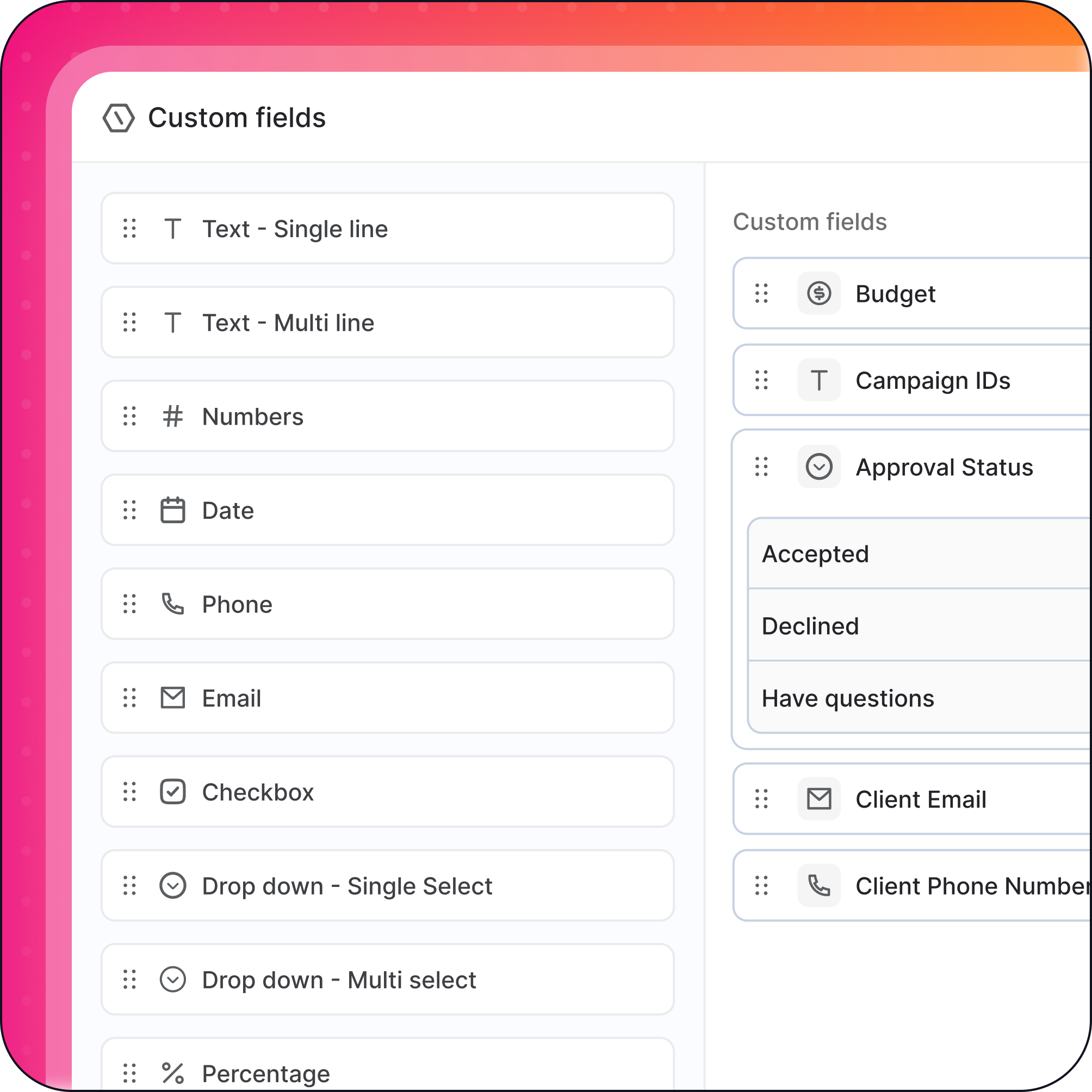
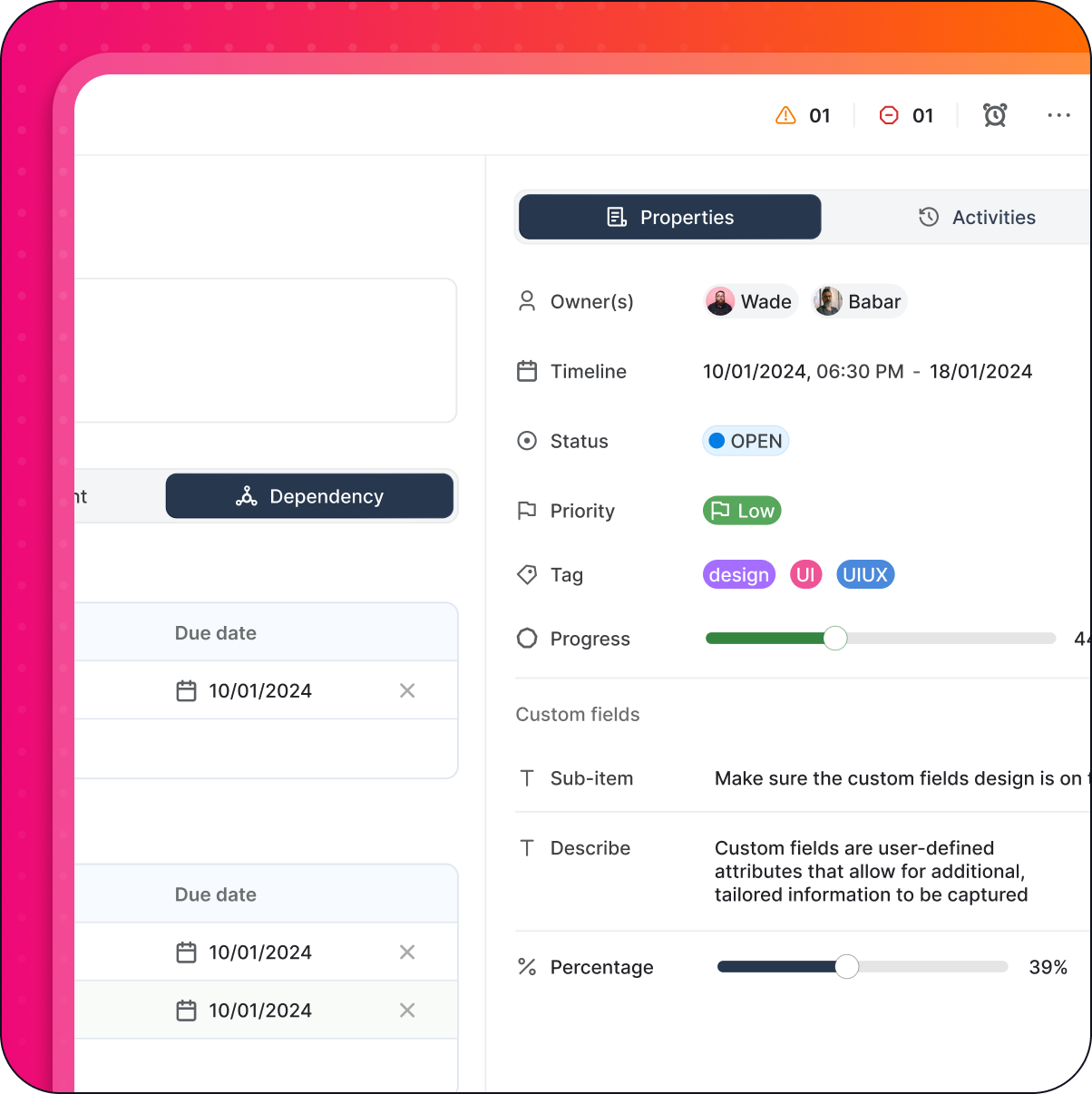
Add dropdowns, dates, numbers, text fields, or checkboxes to capture exactly what each project type needs - no dev work required.

Tag by client, stage, priority, or anything

Track budget codes, campaign IDs, content formats, approval status - whatever keeps work moving for your service delivery team.

custom task1

Filter, sort, and find what matters - fast

When you’re managing dozens of tasks across multiple clients, generic views don’t cut it. Astravue lets service delivery managers and project leads slice the workload by the dimensions that drive decisions.

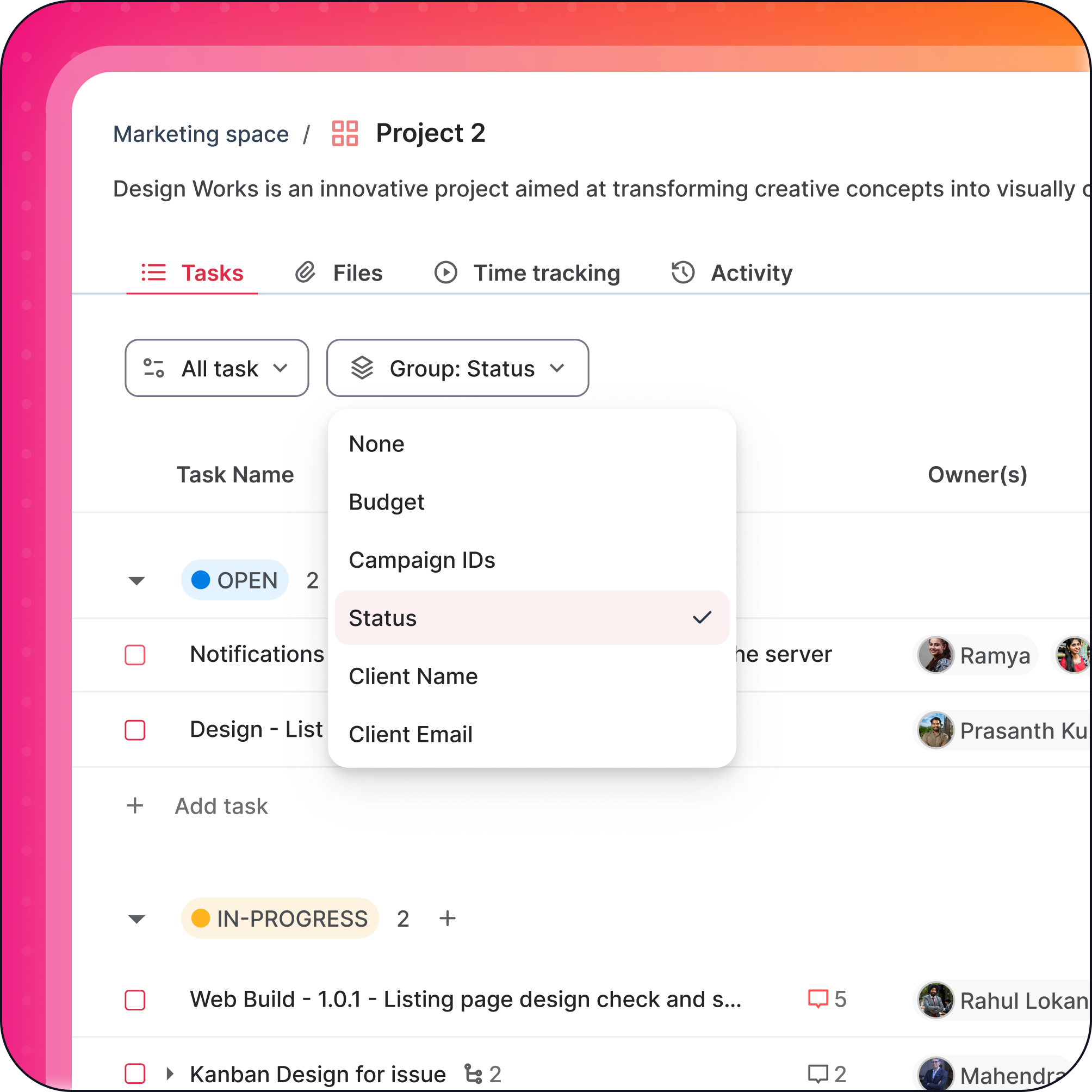
Filter by any custom field

Find all tasks awaiting client approval, all deliverables over budget, or all items in a specific campaign - in seconds, not minutes.

Sort by what drives your decisions

Organize views by priority level, deadline, client name, or any custom field you’ve created - so your team always works the right problem next.

custom task2

Standardize without losing flexibility

When every team member tracks work differently, reporting breaks down and errors multiply. Astravue helps agency owners and marketing heads enforce consistency while still adapting to each project’s unique needs.

Templates with pre-configured fields

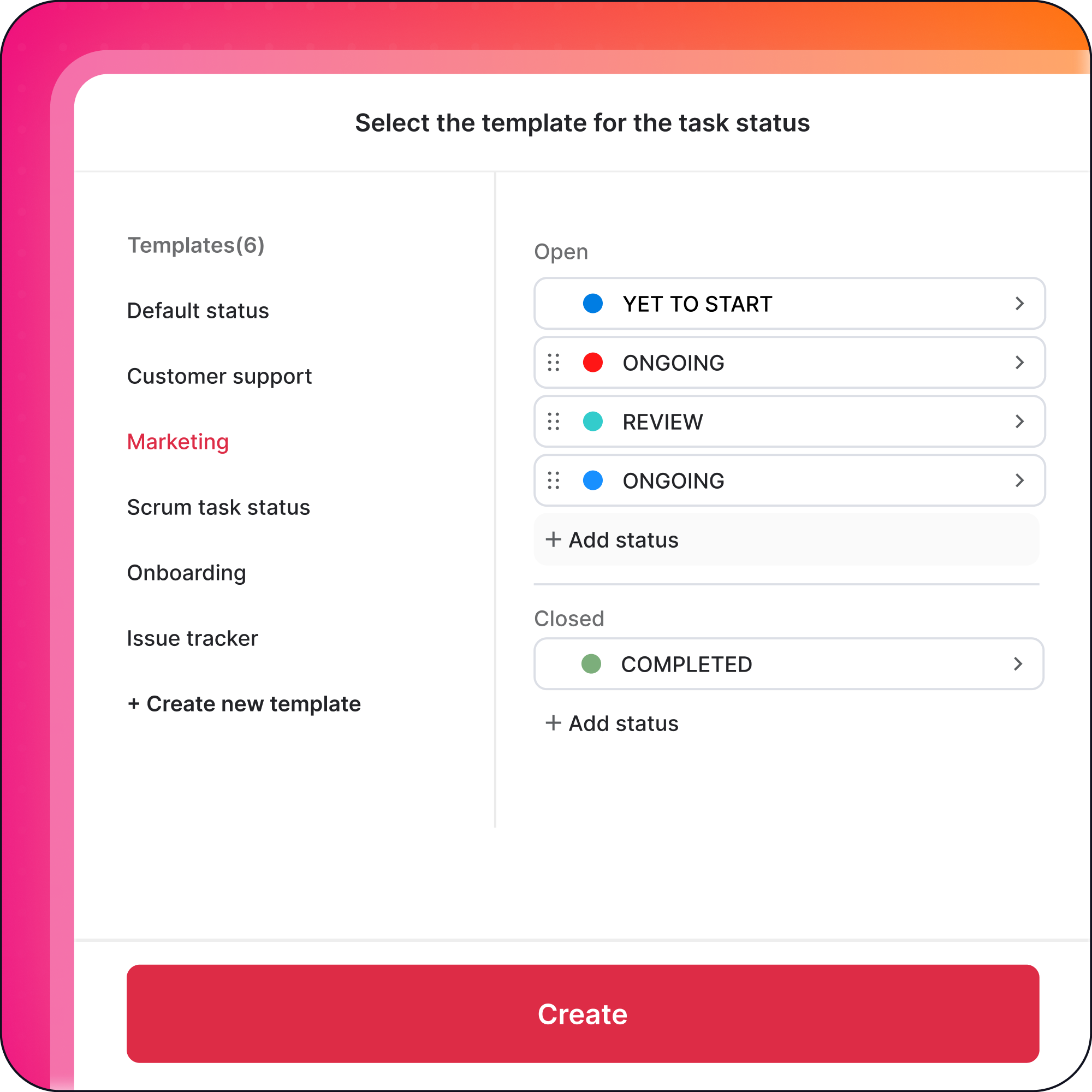
Launch recurring project types - retainers, campaigns, audits - with the right statuses and fields already in place. No manual setup every time.

Color-code for instant status clarity

Assign colors to custom statuses so your team instantly sees what’s urgent, blocked, in review, or ready to deliver.

Custom task3

Project & Task Management

Deliver projects on time while tracking time, cost and margin in one place.

vector icon

Tasks

Break work into actionable tasks with clear owners, priorities, due dates, and billable status.
vector

Projects

Plan and manage client or internal projects in a shared workspace with timelines, budgets, and progress tracking.
Frame (21)

Views

Switch between List, Kanban, Calendar to match how your team works.
Frame (23)

Subtasks & Dependencies

Structure complex work with dependencies so teams always know what comes next.

Common Questions About Astravue

What is a project management tool with custom fields, and why do agencies need it?

A project management tool with custom fields lets teams define their own data points – such as client names, budget codes, approval stages, or campaign IDs – beyond the default fields a standard tool provides. Agencies need this because every client engagement has unique tracking requirements. Custom fields let agency teams capture every dimension of their work, standardize reporting across projects, and filter tasks by criteria that actually drive delivery decisions.

How do custom status fields improve project delivery for professional services teams?

Custom status fields allow professional services teams to define workflow stages specific to their process, such as “awaiting client approval,” “in legal review,” or “scope confirmed.” This replaces vague defaults like “in progress” with meaningful, actionable states. Teams can filter by these statuses to instantly identify bottlenecks, prioritize work, and give clients accurate progress updates. The result is fewer delivery surprises and faster handoffs between departments.

Can project managers use custom fields to track budgets and client data across multiple projects?

Yes. With Astravue’s custom fields, project managers can add number fields for budget tracking, text fields for client codes, and dropdown fields for billing stages — then reuse those same fields across every active project. Combined with filters and sorting, a project manager can instantly pull a view showing all tasks over budget or all deliverables awaiting a specific client’s sign-off, without switching between spreadsheets or separate tools.

What types of custom fields does Astravue support for workflow tracking?

Astravue supports multiple custom field types: dropdown menus for predefined options like approval stages or priority levels, date fields for deadlines and milestones, number fields for budgets or hours, free text fields for notes or campaign IDs, and checkboxes for binary states like sign-off or compliance flags. All field types can be filtered, sorted, and reused across projects.

How is Astravue different from other agency project management tools when it comes to custom workflows?

Most project management tools offer a fixed set of fields and statuses that teams have to work around. Astravue is built for professional services teams that run complex, multi-client workflows. Unlike rigid tools, Astravue lets you build a shared field library, lock critical fields for data integrity, and create project templates with pre-configured statuses and fields — so your team can launch a new client engagement in minutes with zero setup overhead.

Can marketing heads and agency owners use custom fields for cross-team reporting?

Yes. Astravue’s shared field library ensures every team member uses the same field names and values when recording project data. This consistency makes cross-project and cross-team reporting reliable. Agency owners can filter and sort across all active projects by custom dimensions like client, campaign, or budget code to get a real-time picture of delivery health without waiting for status meetings.

Your work is too specific to fit inside someone else’s defaults

Every agency, professional services team, and service delivery operation has its own way of working. Your clients are different. Your approval stages are different. Your budget codes, campaign structures, and delivery milestones don’t match what a generic tool assumed when it was built.

That’s the exact problem Astravue’s custom status and fields are designed to solve. With the ability to define your own field types, tag work by any dimension that matters to your team, filter and sort instantly, and standardize reporting across every project - your whole team moves from reactive firefighting to proactive, confident delivery.

Project managers get visibility. Marketing heads get reliable reporting. Agency owners get accountability across every client. And your team spends less time chasing status updates and more time doing the work that earns renewals.

vector

For project managers

Full visibility into every task, budget, and approval stage - filtered exactly how you need it.
vector

For agency owners

Consistent, cross-team reporting you can trust - without chasing people for status updates.
vector

For service delivery

Workflows that match how your team actually operates - not how a tool thinks you should.

Stop working around your tool. Start working inside one built for you.

Astravue is free to try. Set up your first project with custom fields in under five minutes.

Tick Feature Section
Free 14-day trial
No credit card required
Cancel anytime
carousel text